Internet advertising isn’t all graphic design and keyword research, as important as those things may be. Sometimesonline advertising methodslook like neatening up your site’s layout, tracking numbers and figures, and similar prep work. Check out our steps below so that your site is up to snuff before launching your big ad campaign!
Step One: Optimize That Landing Page
Your landing page is what appears to customers in response to a search engine optimized result. In plain English, it’s your customer’s starting point, the first glimpse they get of your website, and sometimes your brand.Landing pagesaren’t necessarily the same thing as home pages, but there’s often overlap.
Point being? First impressions matter, especially when preparing your site for digital advertising. If you want to amp up those conversions, you need to make that first impression count.
Keep it Simple
We’ve discussed this in previous posts, but when in doubt,simplifyyour landing page. Navigating your site should be a straightforward experience, especially for first-time users. Are links easy to locate? Have you clearly stated your brand’s mission, your CTA(s), or what your business does that no one else can? Consider removing pop-up ads (unless they are indeed useful), dead links, gratuitous buttons and graphics, and so on.
Ensure it’s Mobile-Friendly
A staggering86% of the top landing pagesare optimized for mobile—emphasis on the wordtop. Customers don’t have the patience for non-responsive sites, oversized images, tiny text, or any other problems that come with a non-mobile-friendly site. Your customers will be more receptive to your digital advertising campaign if they can easily access it on their phones as well as their PC.
Step Two: Track the Impact of Ads
The last thing any of us would want to discover is that our hard-earned advertising budgets were being funneled away on a failed campaign. That’s why it’s essential to track the ads’ success at all stages of your marketing plan.
Get Organized
Look, we get it. Tracking ads can be arduous, especially when you have to do it weekly or even daily. But a wise man once said, “your habits will determine your future.” Your future being, in this case, the success of your business.
We recommend setting reminders in yourcontent calendarto review the stats of your ad campaign regularly. Determine what’s working well and what needs improvement. Whenever possible, point to specific numbers and percentages to back up your claims. Better to find out that one aspect of your campaign isn’t going according to plan early on instead of halfway through the year. Or, worse yet, after the campaign is already over and done with.
Track Your Success on a Variety of Channels
Okay, we admit it, telling you to “check up on your campaign” regularly is pretty vague. What do we mean by that, exactly? Where exactly should you be checking?
The short answer? If it can be monitored, and if it’s a means by which customers hear about or get in contact with your business, track it! We’re talking about conversion tracking on Google AdWords and Facebook Ads, as well as CRM andKPItracking. Heck, we’re even talking about tracking incoming phone calls.
Now, wait a minute—phone calls? That’s right; those customers hear about you fromsomewherebefore they call you, don’t they? So ask them where they heard about you! Was it from a Facebook ad? Or perhaps a Google one? Feedback like this will help you figure out where most of your ad budget should be going. And if you forget to ask, don’t worry. Phone tracking systems like Dynamic Number Insertion assign different numbers based on the source of the call. In other words, you can see what site a customer is calling from without actually asking the question.
Step Three: Ensure You Can Handle the Surge in Leads
We don’t typically think of sites being unable to handle heavytrafficthese days. After all, this isn’t 1997! An influx of guests isn’t going to mess with page load times, is it?Well. . . yes, unfortunately, this can still happen, even in the year 2020.
We discussed keeping things simple in Step One, and the same applies here. Optimize file and image sizes, cache heavily, and anything else that will minimize lagging. And speaking of “tracking the impact,” it pays to monitor what times of day, and in response to which ads, traffic surges. That way, you can prepare yourself for those spikes when they’re most likely to occur.
Remember, as frustrating as slow load times and increased traffic can be, they’re actually a blessing in disguise. Your business is booming, and your ads are, indeed, effective! If those aren’t reasons to be proud, we don’t know what are.
Partner With Snap, Your Internet Advertising Guide
Need to create a knockout ad campaign? No problem! We’ll set you on the right path for crafting landing pages, regularly monitoring analytics, and preparing for hiccups such as surges in traffic. For a full rundown of our digital advertising services,shoot us a message. We can’t wait to hear from you.
Law firms need visibility just like any other business, no surprise there! And for many, that meanslocal SEO. This is not as simple as inserting the right keywords; SEO for lawyers means staying up-to-date on Google My Business, local ads, and similar cutting-edge SEO tactics. Without further ado, let’s examine some of these tactics more closely and see how attorneys can incorporate them into their practices.
Google My Business
We’re not exaggerating when we say we love Google My Business. A one-stop shop for your company address, contact info, and a link to your homepage is ideal for boosting a law firm’s visibility quickly. Google My Business listings are also perfect for pairing with local SEO.
We’ve discussed programs like Google Search Console before, which help companies research andchoose the best matches for keywordsand keyword phrases. Once your law firm has conducted a little keyword research, you can pop said keywords right into your Google My Business post.
Let’s say, for example, that your law firm operates in Minneapolis, and standard search phrases include “best attorneys in Minneapolis, MN” and “Twin Cities professional law firm.” Does yourGoogle My Businessdescription include these phrases? Do FAQs, or answers to customer queries on your GMB listing, have them? It’s all about honing in on what your customers care about and search for the most—and directly addressing those points or queries.
Voice Search
Back in the days of yore, Siri or Alexa’s voice search was for asking silly questions with equally irreverent answers. Nowadays, voice search is a powerful marketing tool on mobile and personal computers alike.
Consider that58% of peoplehave used voice search to get info about a local business. You know how it is: you’re driving around in search of a fantastic professional service near you, and you ask Siri to find something within driving range. The same happens with attorneys; it’s more convenient to find a skilled lawyer in your area than drive miles out of your way.
Point being? Tailor your local SEO for voice search! One way to do this is by incorporating SEO keywords intofeatured snippets. These are the boxes of larger text you typically see at the top of a Google search, and they exist to answer the user’s question immediately. Over 40% of voice search answers come from these magical “answer boxes,” so remember that when writing content. While you can’t ensure you’ll be featured in a snippet yourself, structuring your writing as short answers to specific queries will boost your likelihood of that happening. For example, one of your FAQs could look a little something like this:
Q: “Who are the top local criminal law firms in Minneapolis, MN?”
A: “[Your Business Here] is a top local criminal law firm in Minneapolis, MN. We specialize in…”
See what we mean? Easy as pie.
Local Ads
There’s truly nothing like a good old-fashioned digital ad. And to be completely frank, that can mean so many things for a local law firm. Maybe that means partnering with a local influencer, or creating ads that reference specific locations in your metropolitan area. It could also mean brushing up on your knowledge ofgeofencingand developing ads that appear to users within certain pre-ordained geographic boundaries. This could simply be some thorough keyword research and incorporating those top search terms into your Google Maps Ad campaign. With SEO for lawyers, “local ads” sure does sound like a catch-all term, but we prefer to think of it as room to explore and innovate.
The (New) Google Screened
If you’re a professional service firm (*cough, cough* such as a law office), you should know about the all-new Google Screened! It’s sort of like being “verified” on Instagram, but for local businesses. Google Screened for lawyers means an extensive background and license check to make sure you’re the real deal. If you pass the test, you earn a green checkmark next to your business’s name. And if your client is caught between a local attorney with that green checkmark and an attorney without one, which one seems more reputable?
So what are you waiting for? Get your law firmverifiedon Google Screened before the market becomes oversaturated with those green checkmarks. It’ll do wonders for your business—especially if you act quickly.
Snap: Spotlight on Local SEO for Lawyers
Local SEO for lawyers can be challenging; we get it. Standing out among the competition is hard enough, even without being held to such high professional standards. Luckily, here at Snap, we have a strong eye for detail and the latest and greatest SEO trends. For help navigating attorney marketing and the professional service landscape, we’re here to help.Give us a call today.
Because every visit is a chance for something good to happen.
That’s why increasing website traffic is the first goal of most digital marketing strategies. It’s the equivalent of traditional marketing’s goal of brand awareness.
If we’re going to spend all this time, energy (and maybe money) to generate traffic, let’s first spend a few minutes to understand the sources of website traffic, how they’re defined and how they’re measured.
How is website traffic measured? Categorized?
How can I increase traffic from each traffic source?
How accurate are traffic sources in Google Analytics?
This guide breaks down the traffic sources of website traffic and includes tips for increasing traffic from each.
*Not always the case, this guide shows why these aren’t quite what they seem.
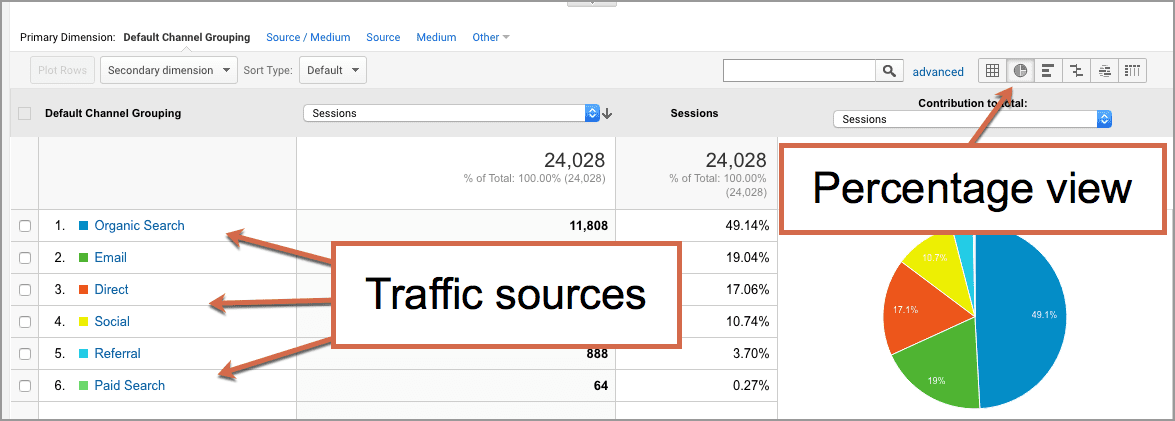
Here’s how the traffic sources look in Google Analytics.
Assuming that marketing campaigns (such as advertising and email newsletters) are tracked using UTM tracking codes with a URL builder, this is what the Acquisitions > All Traffic > Channels report will look like. To see the percentage view, click on the pie chart.
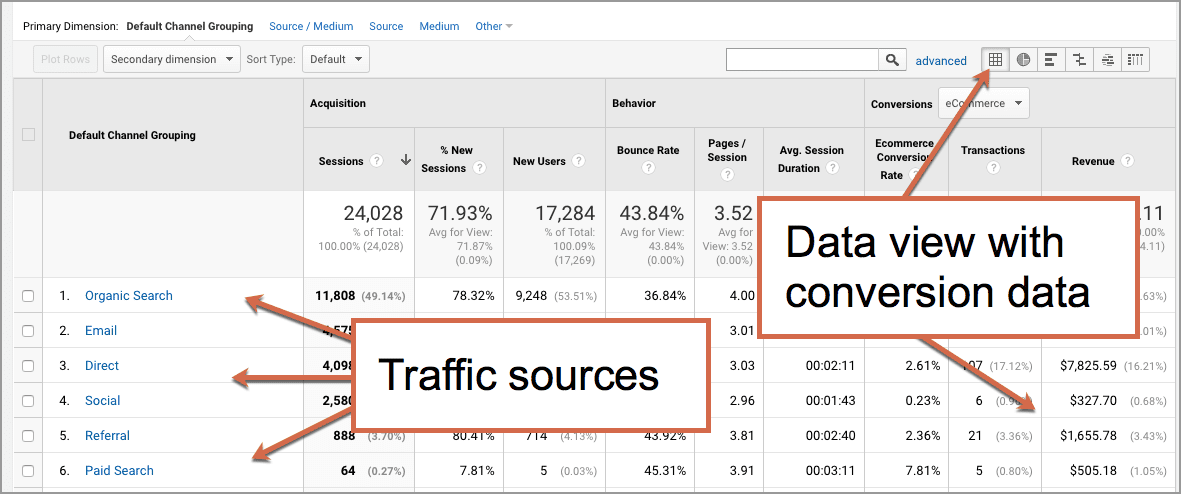
If you switch back to the data view, you’ll see behavior metrics (bounce rate, pages per visit, average length of a visit) and the conversion metrics (the percentage of visitors who took action) for each source of traffic.
Useful for tracking the effectiveness of various marketing efforts.
Let’s look more closely at each specific source of website traffic. But first, here’s a helpful way to think about the sources and the efforts that make them go.
Oars, Sails and Motors
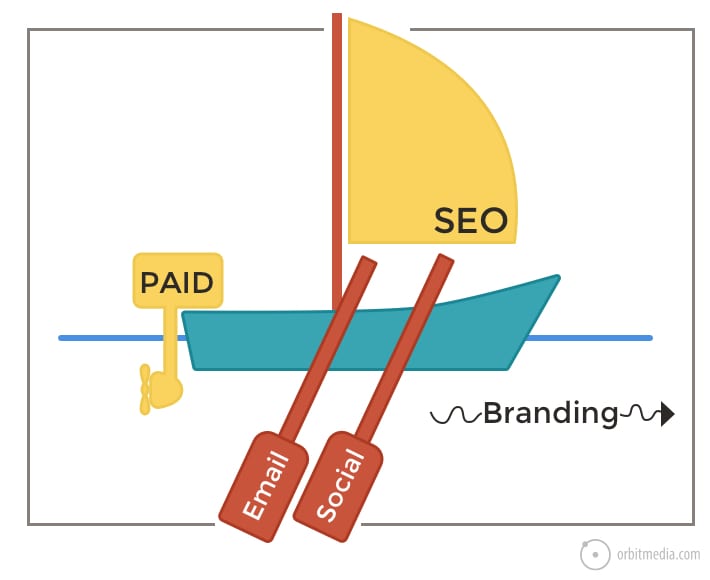
Here’s a fun little metaphor we’ll use to help us understand the sources of traffic to websites.
Imagine weighing anchor and heading out to sea for a fishing trip. The farther you go, the more fish you’ll catch. You want to go far, go fast and you don’t want to break your bank account (or your back) in the process.
You’ve got a few options: sail, row or fire up the motor.
1. Paid advertising (The motor)
Anyone can buy traffic. Social ads, pay per click, retargeting and banner ads (usually called display ads) are certainly one way to get the boat moving.
Here are the defining traits of paid traffic.
Advertising is fast. Pick your platform, set a budget, create your ads. Day after tomorrow, you’ll have paid traffic.
Advertising is temporary. You’ve got to keep buying gas or the motor doesn’t run. Turn it off and it stops as quickly as it started. The other sources of traffic are more durable.
Advertising is expensive. We all know tales of captains running huge, expensive motors at full speed and not catching a single fish.
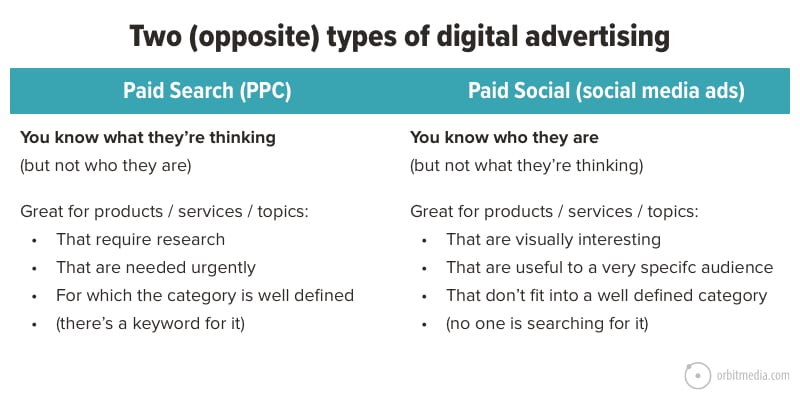
Advertising is targeted. The quality of the visitor is high because you often know more about them based on the click. They must be interested or they wouldn’t have tapped on your ad. But there are really two kinds of ads and therefore two kinds of targeting.
Nobody goes to Google to browse. And no one goes to Facebook to look for something specific.
A skilled digital strategist can look at a product, service or headline and know where it will perform: paid search or paid social.
User data is digital currency. It can help you run better, more empathetic and less interruptive paid campaigns like account-based marketing (ABM) and retargeting. Beyond paid search and social, digital advertising empowers marketers to reach audiences across channels, and personalize ad experiences based on what we know about users and their behaviors.
How to increase website traffic with paid advertising:
Sure, anyone can buy traffic. But when you’re paying for visitors, it’s even more important that they’re qualified and able to take action.
Choose the right advertising strategy (search, social, ABM, retargeting) for the right audience, content, and goals.
Use targeting to be as relevant to the user as you can. (Without crossing the line from helpful to creepy.)
Put yourself in the mind of your audience, and offer them something relevant and valuable enough to act on—both in your ad and on-page.
2. Organic: Search Engine Optimization (Sails)
Just like sailors rely on the weather, SEOs are subject to the winds of Google. But sailors who know search optimization often go very far very efficiently.
Here’s why: every page can catch traffic, like a sail catches wind.
Search traffic is durable.
A page that ranks for a given phrase is likely to keep ranking. Many of the listings we see in search results have been there for months or years.
Keyword opportunities are virtually limitless.
Unlike a boat, which can only hold so many sails, there is no limit to the number of pages you can publish and phrases you can target. Some sites rank for millions of pages.
Search is hypercompetitive.
You need super high quality content because you’re competing with the 10M+ pages that are relevant for your target phrase.
Beyond that, every brand now has to compete with Google itself. Each year, there are more “SERP features” which pull attention away from organic listings and reduce click through rates to websites. This is the biggest trend in SEO.
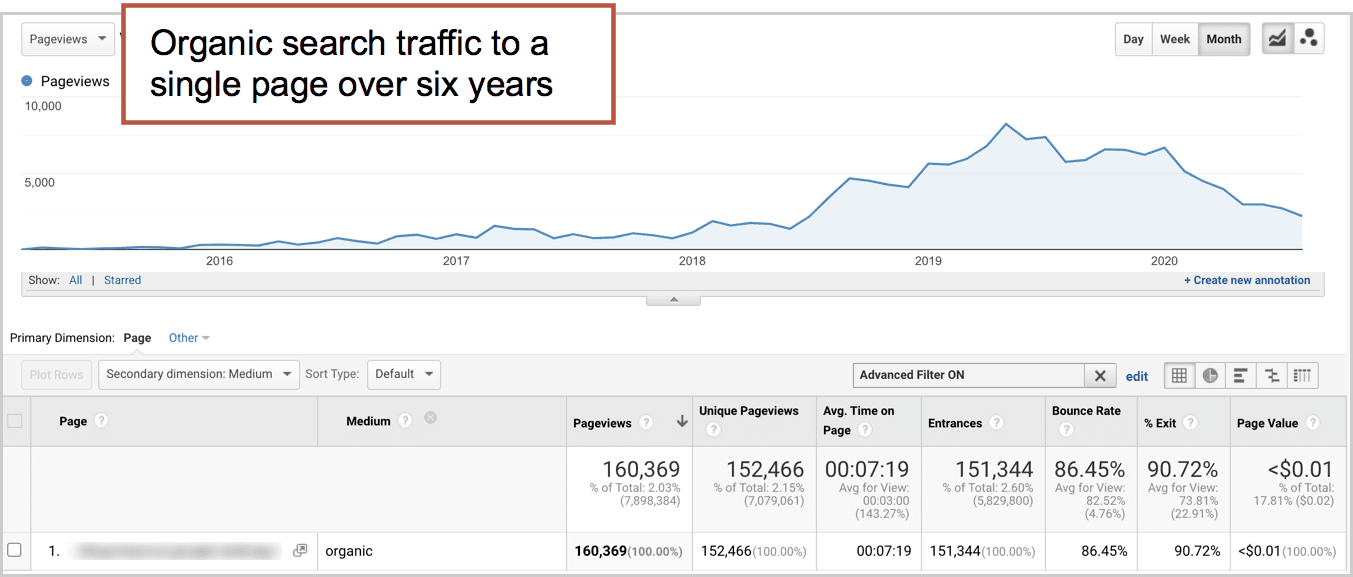
When it works, organic search is a durable, almost passive source of “free traffic.” You get more traffic with less continued effort. You could stop marketing completely and keep pulling in visitors for years.
But it’s hard to predict and it’s often slow, uncertain work. If this is your maiden voyage (new website, young domain) be patient. It’ll take a while.
Analytics issues with organic traffic
Medium exactly matches organic
That’s how Google Analytics categorizes organic visitors in the Channels report.
But here’s the problem: Many of these visitors didn’t “discover” you in search at all. A lot of them were already brand-aware but forgot your web address. So they searched for your company name, saw you there in position #1 and clicked. Organic traffic! But not discovery.
So a lot of organic traffic is basically direct traffic.
You can check Google Search Console to see what percentage of your organic traffic were for branded (navigational) queries, as in your company name.
How to increase website traffic from search engines
Target phrases based on your own Domain Authority (here’s how)
Write very detailed pages that answer all the questions related to your topic. (One great, comprehensive page is better than lots of little pages.)
Go back and improve or rewrite older, almost-high-ranking pages (here’s how)
3. Social Media (Oars)
Stroke! Stroke! Stroke!
Social media traffic requires social media activity. Every time you pull those oars, you can move ahead a little bit. But if you stop, you won’t coast for long. You’ll soon be dead in the water.
Here are the defining traits of social media traffic:
Social media is unpredictable.
Even with consistent activity, you’re going to see big spikes and valleys in traffic patterns. Anyone know what’s going to trend tomorrow? Is anybody really good at “viral marketing?”
Social media isn’t just about traffic.
It’s about networking, PR, customer service, influencer marketing and listening. None of these are measured in Analytics. If your only reason for being active on social media is to attract visitors, you’re probably going to be disappointed.
(Some) social media can be delegated and/or automated.
You can’t replace yourself with a robot. But the types of social posts that drive traffic can certainly be scheduled or even automated.
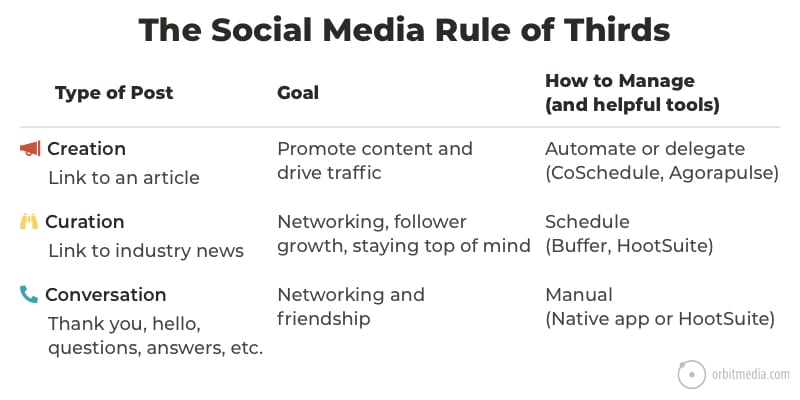
There are basically three kinds of social media posts, and promotional social posts (sharing your own content to drive traffic) can be managed through tools (scheduling and automation tools like CoSchedule).
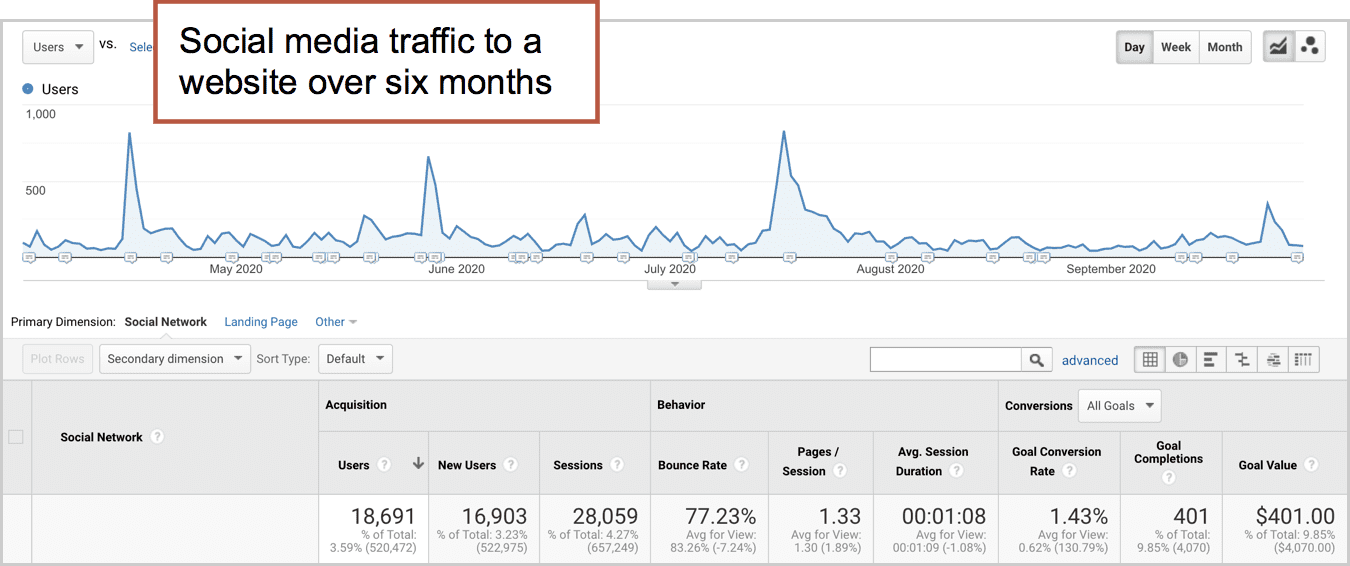
Here’s what social media traffic often looks like in Analytics. Spikey, isn’t it?
Analytics issue with social traffic
Social Source Referral exactly matches Yes OR Medium matches regex ^(social|social-network|social-media|sm|social network|social media)$
That’s how Google Analytics knows what traffic to categorize as social media in the Channels report.
So “social media traffic” drastically undercounts traffic from social shares. Here’s why:
Something like 80% of all sharing (source) is not trackable as social shares. This traffic is called “dark social” because it’s not accurately tracked by Analytics. Dark social includes:
Clicks on links shared in text messages
Clicks on links shared in email messages
Clicks on links shared in messaging apps (What’s App, etc.)
Clicks on links shared in chat applications (Gchat, Slack, etc.)
Campaign tracking code with UTM parameters would fix the problem. But these are just random visitors copying and pasting URLs out of the address bar and into an app or an email. No tracking code. So most of these will get recorded as Direct traffic. More on that in a bit.
How to increase website traffic from social media
Sharing more content more often using every trick in the book! (here’s how)
Create short social videos that promote your content (here’s how)
Avoid Instagram
4. Email Marketing (Oars)
Sometimes there is no giant tech company, such as Google or Facebook, between you and your potential visitor. That’s email. It’s the one digital channel you own and you control.
You don’t own your social followers or search rankings, but you do own your email list.
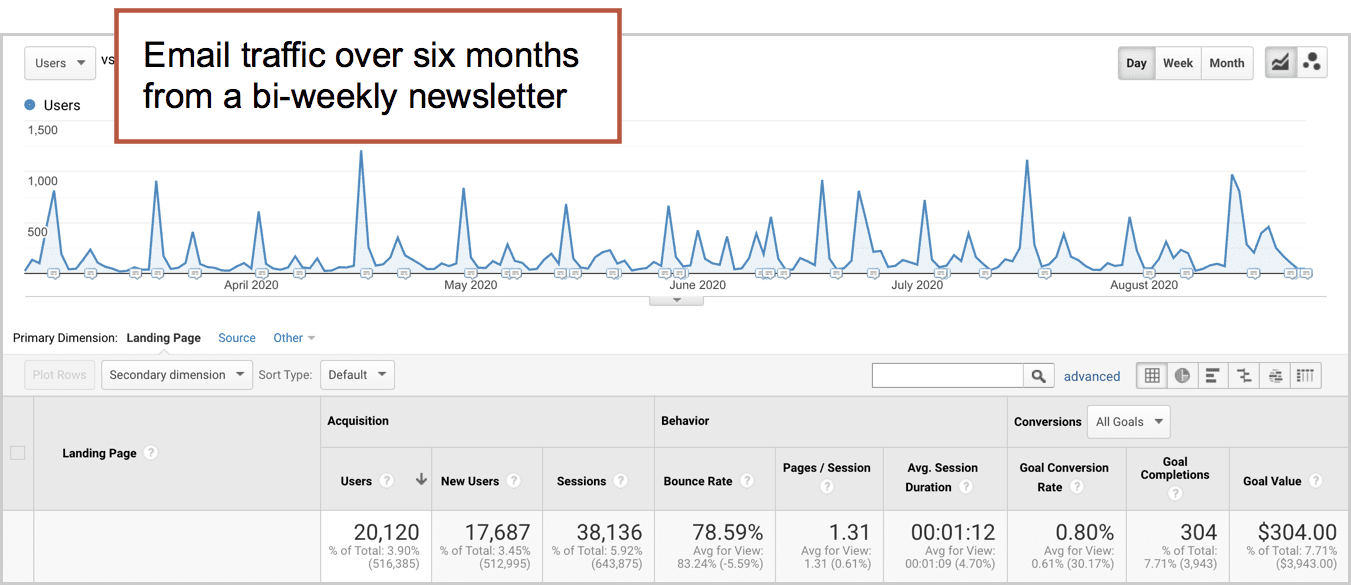
Email is very spiky like social, but more consistent over time.
A rowing team gets results through repetition and coordination. The Olympic-level email marketers are just as consistent and organized. Here are the defining traits of an email marketing program:
Email marketing is about consistency
Email drives the cadence of a content strategy. It’s in sync with publishing calendars, event schedules, product launches.
Email marketing is about trust
The subscriber has control. You have a sender name and subject line. To win an email visitor, you need to first build enough trust through your content to get their email address, then build your reputation in the inbox to get opened and clicked.
Email gets a little easier
Results gradually improve as you build your email list and try new things. What’s working? Ever tried sending on a weekend? Changing the sender name? Doubling frequency?
Analytics issues: Email traffic
Medium exactly matches email
That’s how Google Analytics knows what traffic to categorize as email in the Channels report.
Simple, right? Yes, but only if you add tracking code. Add it to every inbound link in every email you send. It doesn’t take long. Follow these instructions and use this campaign URL builder.
How to increase website traffic from email
Make your sender name a person, not a company (here’s how)
Make sure your subject lines are “front loaded” with a specific promise (here’s how)
Send more email. But first, segment your email lists. Then send targeted content to targeted audience groups.
5. Direct Traffic (Current)
Just like the current under a boat, brand awareness drives traffic. They know the brand, they type the address into a browser, a direct traffic visitor arrives.
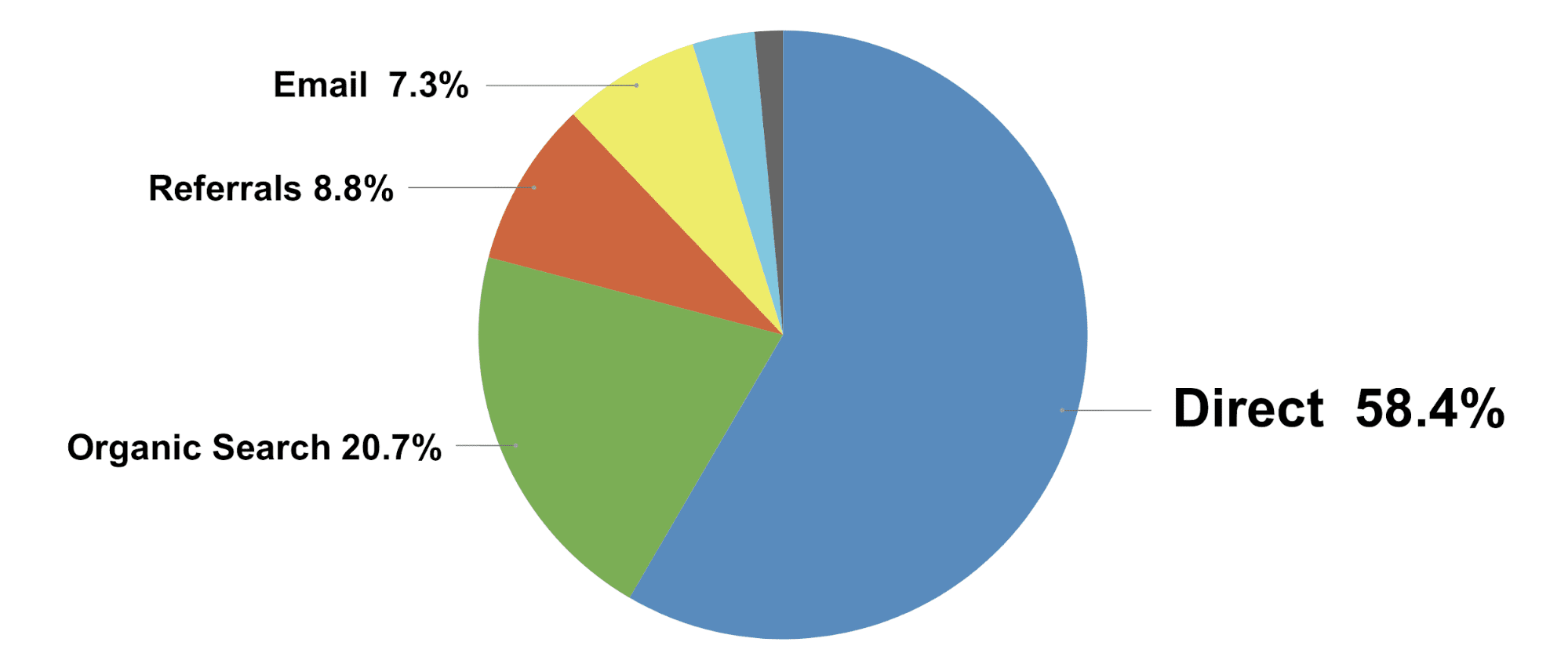
It’s probably the least discussed source of traffic, but it’s the most important. I asked my friends at SimilarWeb to share the traffic source estimates from the top online marketing companies. Direct traffic is the top traffic source by a lot, more than all other sources of traffic combined.
Probably most internet traffic is direct traffic, but people don’t talk about it much. There’s also a lot of confusion about it.
Analytics issues with Direct Traffic
Source exactly matches direct AND
Medium exactly matches (not set)
OR
Medium exactly matches (none)
That’s how Google Analytics knows what traffic to categorize as social media in the Channels report. Look at that last part. If there is no medium for the visit, it gets counted as direct!
So here’s the misunderstanding:
Direct traffic is supposedly from visitors who typed your address into their browser, but it’s actually all unknown sources of traffic. It’s direct traffic if the visitor…
Typed the URL into the address bar
Clicked a bookmarked or in browsing history
Clicked a link that wasn’t in a browser (PPT, PDF, QR code, app, etc.)
“Dark Social” shares (links in email apps, chat, slack, SMS text messages)
Incognito/private browsing mode
Clicked a link with bad campaign tracking code
Clicked from HTTPS to HTTP page
Any visit that isn’t from a search engine, social network or referring website and has no tracking code is lumped into direct traffic. A better name for it would be “Unknown traffic.”
There are ways to minimize these issues, but Google Analytics will never be 100% accurate. And that’s fine. We only need it to be accurate enough to help us make good marketing decisions.
How to increase direct traffic
This is a really interesting question that no one ever asks. I’ve never heard of anyone setting a goal to increase direct traffic. But why not, right?
Keep that current of direct visitors flowing by doing anything that builds brand awareness.
Offline advertising (TV, radio, print, outdoor)
Launch a useful tool
Do more networking, live events, presentations, podcasts or anything else where people talk to each other
6. Referral Traffic (current)
Here’s another source that people don’t talk about much, probably because it doesn’t align with a marketing activity, unlike search, social and email.
But like direct, it can be a consistent current under your boat.
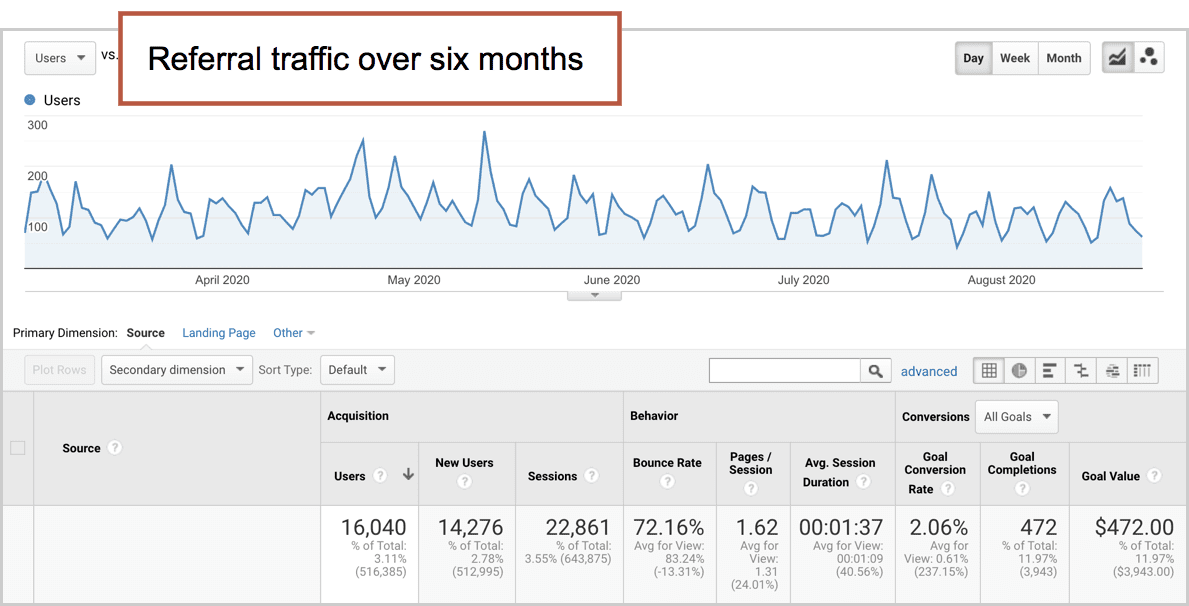
Spikes usually come from news mentions and links on blog posts. Steady traffic often comes from directories.
Analytics issues with Referral Traffic
Medium exactly matches referral
That’s how Google Analytics knows what traffic to categorize as social media in the Channels report.
That’s pretty straightforward. It should be all traffic from other non-search, non-social websites. But in reality, a lot gets caught in here, including a bit of search and a bit of social.
Check your Acquisition > All Traffic > Referrals report to see which sites are sending you visitors. You’re likely to see sources that are obviously email (mail.google.com) or search (uk.search.yahoo.com)
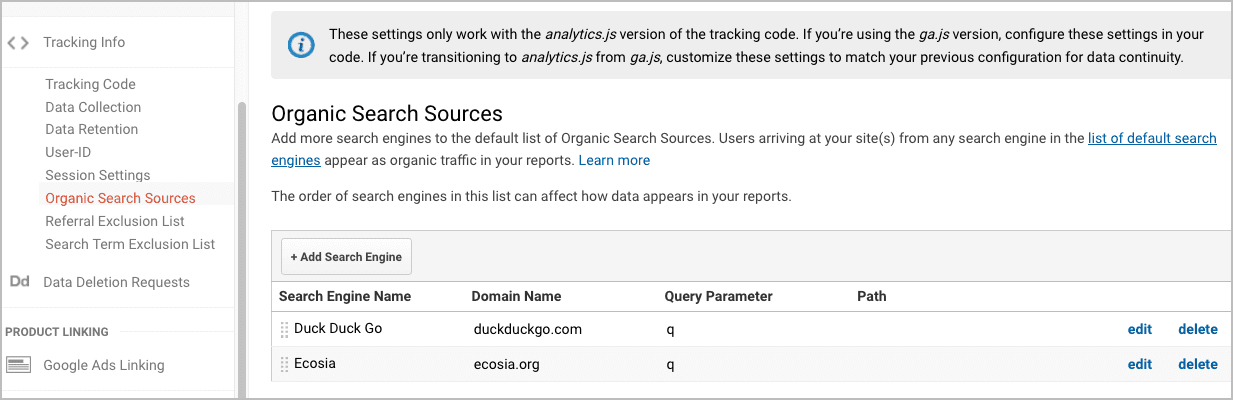
If you’d like to have more sites tracked as organic search sources, rather than referral sources, you can add them in the property settings.
Here you can see we’ve added Duck Duck Go and Ecosia …which apparently isn’t necessary anymore. They’re on the list of default search engines.
How to increase traffic from referral sources
Submit your site to all relevant directories (consider paid inclusion directories if they rank for your target phrases)
Write for other sites often (guest posting is a powerful approach to referral traffic)
Do something newsworthy! Think of link building as digital PR.
Diversity is good, Matey!
The best fishermen don’t always go to the same lake.
The best marketers don’t rely on one source of traffic.
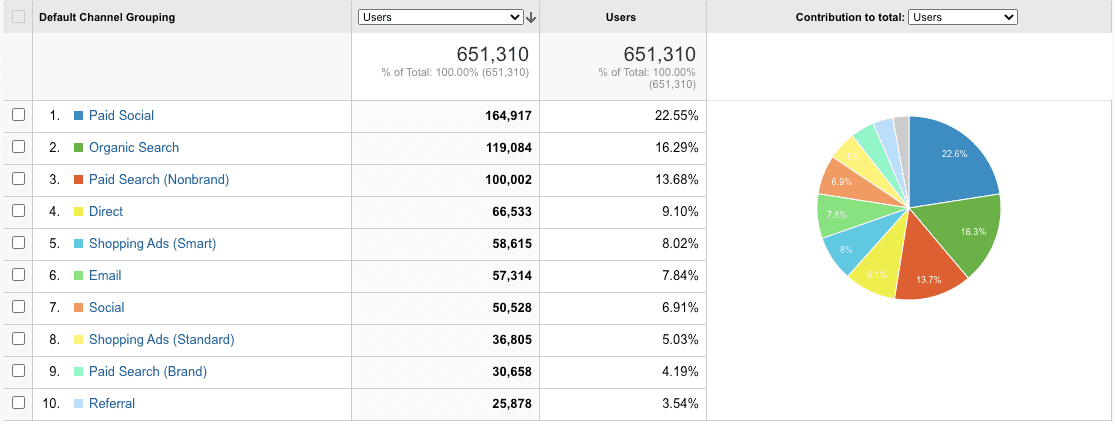
Smart marketers diversify their traffic sources. It’s risky to rely too heavily on one traffic source, especially search and social. We can’t control what big tech companies do with their algorithms.
A friend of mine shared the breakdown of his default channel groupings. It’s impressive. None of his traffic sources make up more than 23% of his traffic. Take a look:
Clearly he has a budget. In fact, he has a team dedicated to each channel. Must be nice to have that kind of fishing fleet!
Read next: What’s a good bounce rate?
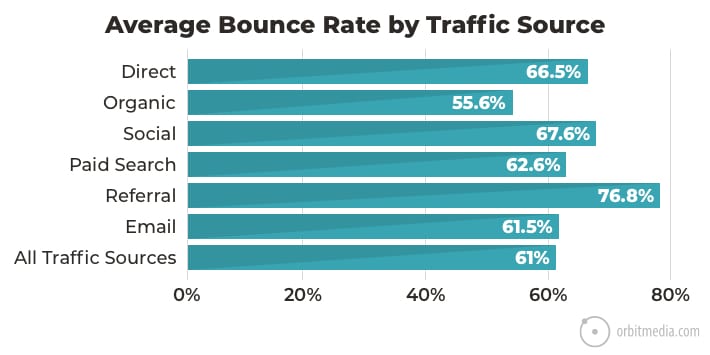
We looked at 500 Analytics accounts and found the average bounce rate for each of the online traffic sources. Here’s are the averages:
Google has always wanted to be the most popular and effective search engine out there, and we can’t help but admire their ambition. But staying the biggest and best means rolling out new features to keep customers happy and the site running smoothly.
The same goes for Google Ads. If you’re up to date on advertising anddigital marketing trends, you may have seen Google throwing around terms like “responsive search ads” and “Google Search image ads” before. And no, these aren’t your run-of-the-mill Google image searches or sidebar ads, even if the phrases do sound similar. The development is a bit bigger than that, so let’s examine just what Google means by “testingimagesin responsive search ads.” Buckle up; there’s a lot to unpack.
First of All, What Are Responsive Search Ads?
What does a traditional search ad look like? Static headlines with equally unmoveable text are probably what come to mind. Marketing experts craft the ad, and the finished product appears the same way to anyone who makes a relevant search.
But what if you could mix and match headlines to narrow in on your demographic? Withresponsive search ads, you’ll be able to enter multiple headlines and bodies of text from the get-go. Google Ads tests different combinations of headlines and text bodies to see which are the most effective to audiences.
For example, let’s say that you’ve created several headlines and text bodies—we’ll have letters represent headlines and numbers mean the text. For some audiences, Google would use the header “A” with text body “1.” On others, “A” may be paired with text bodies 2, 3, or 4. Bodies 1, 2, 3, and 4 could instead be paired with the headers B, C, and D you’ve created. Mind-blowing, huh? At the end of the day, it’s all about adapting your message to your audience and figuring out which ad combos (ahem, which responsive search ads) perform best. It’s on you, the creator, to come up with eye-catching headers and text bodies, but Google does the shuffling for you. The more options you provide, the more Google has to work with and test out.
Clearly, this issearch engine optimizationat its finest, even though responsive search ads are still pretty new territory. But what if we told you that, on top of these flexible ads, Google was adding images to them, too?
What Will Responsive Google Search Image Ads Look Like?
As crucial as the right keywords and keyword combos are in SEO, we’re still a visually-oriented species. This means that even if your search ads appear in response to the right keywords, your customer’s eye won’t necessarily gravitate toward your ad. Don’t get us wrong, positioning your ad right at the top of the search results gives you some major clout. But images can provide ads with that little extra push to pique a customer’s interest and get them clicking through to your site.
Let’s say, for example, that you’re a high-end bridal shop. Your customer is in search of a snazzy three-piece suit for their friend’s wedding. Pairing an image of a sharply-dressed model with your search ad is sure to catch their eye. In the case that your business sells more than just three-piece suits, you’ll want to prepare different headers, text, and of course, different images in response to those customers’ queries. Sure, you’re still advertising the same business, but you’re highlighting other aspects of that business forother customers. The bride of said wedding, for example, would probably rather see the image of a wedding dress, paired with subtly different text, than the wedding guests. Make sense?
Benefits of Images in Google Ads
There are all sorts of perks in this new development, many of which will only become evident over time. We’ve compiled a list of the benefits of images in Google Ads below; go on, give it a look!
Even greater ad variety keeps potential customers engaged
Honing in even further on the right demographic by curating images as well as text
Images breathe life and authenticity into what could quickly become just a bunch of shuffling headers and text bodies
And that’s just the beginning! As Google continues to roll this feature out, we’ll have even greater insight into how images interact with responsive search ads. It’s difficult to say just yet, but we can’t imagine this development being anything other than successful.
What Other Elements Can We Predict for Google Ads?
Again, we don’t want to do too much predicting without substantial evidence, but we’re 99.9% sure we’ll see an uptick inpersonalized, image-centric ads in the future. Clearly, Google is having some fun with responsive search ads as a whole, so we’ll be keeping an eye on those to see what gets added, tweaked, or removed from this feature entirely. We’re excited to ride the wave of change as Google Ads rolls it out from under us.
Your Business + Snap: An Image We’d Love to See
Want to stay up to date on ad trends like this one? Want some help preparing those headline and text body combos—and finding the most visually striking images to match? Well, you’re in luck, because that’s what we here at Snap do best. What are you waiting for?Message us today; let’s stay on top of the trends together.
We’re always on the hunt for the latest and greatest email marketing strategy. And why, you may ask? Because email marketing is effective. Whether you’re a local mom-and-pop business or a corporate entity, email campaigns reach target audiences in personalized, cost-effective ways. Not to mention that you connect with2.6 billionpotential customers in the process.
Let’s explore further some of the most effective email campaigns and when to use them. Can you identify which technique(s) would be the best for your business going forward? (Hint: it’s likely more than one, if not all of the above.)
1. Remarketing Email Campaigns
At its core,remarketingis the process of following up with customers who browsed your site but didn’t make a purchase. It’s all about reintroducing and re-attracting visitors who may have been on the fence about making a purchase before, and turning them into repeat customers. Ever heard the phrase “second time’s the charm?” (well, okay, it’s typically the “third time,” but you know what we mean). Sometimes all it takes to convert a customer is repeating the same info, while wrapping that info in new, pretty packaging.
What does this email repackaging look like, exactly? That’s up to you! If you want to keep it simple, you may send out the same, catch-all ads with different pictures, email-exclusive deals, customer testimonials, or wording. We suggest taking it one step further and tailoring your remarketed emails toward individual demographics and search habits. What if the email featured the exact item that the customer had been eyeing earlier? Or if it included a “picked just for you” section with itemsgeared toward that customer’s demographics(age, gender, occupation, or income bracket)? Your possibilities are endless.
2. Abandoned Cart Emails
Technically,abandoned cart emailsshould be filed under the “remarketing” header, but they’re such effective email campaign examples that they warrant their own section.
Let’s put it in perspective: there are many reasons a customer might close out of your site with items in their virtual shopping cart. Never fear, not all of them need be bad—maybe their web browser glitched, or the customer got distracted by something IRL. Have you ever been in the situation where you spotted that life-changing product, told yourself, “I’ll look back at it later,” and forgotten the site or product name entirely? In those hair-pulling scenarios, abandoned cart emails ensure that that excellent find isn’t lost in the void of the internet forever.
But enough talk—whatarethese abandoned cart emails, specifically? They’re automated email reminders that customers have closed out of your site without purchasing the items in their cart. In email marketing strategy, we love a good gentle nudge—and in this case, that nudge might be just enough to get your customer saying, “You know what? Maybe Iwillbuy that product, after all!” At the very least, it’ll keep your business on the customer’s radar.
Still not swayed? In a recent study of 41 businesses, carts were abandoned at a rate of nearly70%. Yikes, right? Those stats jump even higher for mobile purchases, where it’s easier to “X” out of a tab on a moment’s notice. Thankfully, abandoned cart emails convert, on average, 10-20% of customers, those stats again being higher for mobile sales. And that’s quite the difference.
3. Drip Email Campaigns
You’ve probably heard of drip marketing, but you might not even realize it. It’s the practice of sending “drips,” which are pre-written sets of messages to customers over time. They’re most prevalent in email marketing, especially for companies with an extensive buyer list who want to reach many people quickly.
Although they’re automated, drip emails aren’t sent out simultaneously, with the same phrases, to every customer. Words or phrases are often adjusted to fit the shopper’sdemographic, purchase habits, and specific behaviors. You, the company, have a slew of automated emails at the ready that are tweaked to fit your customer’s unique profile.
Now, drip campaigns may sound intimidating, especially with all the subtle adjustments that need to happen. Don’t worry, sites like MailChimp are already designed to make the process an easy one. You’ll want to conduct some demographic research in tandem with such platforms, though.
One last thing—send emails with triggers! These are specific actions the customer must take to receive emails. A common example is a post-purchase confirmation email; bonus points if you recommend similar items in the process. Other examples include subscription renewals and sign-ups for more info, or better deals on future products. A good, old fashioned call to action on a drip campaign has been shown to boost clicks up to371%. And that’s quite the leap.
Snap: Email Campaigns Made Simple
We take pride in our email campaigns here at Snap. We’re committed to paving the way in email marketing, whether you’re conducting a drip campaign, remarketing strategy, or something else.Join usto be paired with the best email marketing techniques for your business—and straightforward ways to implement them.
If you work in aprofessional servicesector, you’ve probably heard the term “subject matter expert” or “SME” before. What you maynothave known is that SMEs are one of the strongest ways to strengthen your content, particularly in marketing. They boost the quality of a piece by lending their expertise—and if you can cite them or get them to share your work, even better.
But hold up, we’re getting ahead of ourselves. First, let’s cover our bases and examine just what an SME is, and why they matter so much.
What is the Role of the SME?
The role of the SME is one of authority. That’s a pretty broad description, but we’re completely serious. Wikipedia’s definition of SME is literally “a person who is an authority in a particular area or topic.”
In professional services, it makes sense that you’d have an SME on hand. We wouldn’t trust our medical practitioners, accountants, lawyers, etc. unless they were authorities in their fields, would we? Whether they’re offeringdata-driven insights, contributing to written or visual content, or simply lending you a quote, SMEs are invaluable people to have in your corner.
In Digital Marketing, What Kinds of People Are SMEs?
The term “SME” may cover quite a bit of territory, but there are several traits that make SMEs stand out in online marketing. Let’s break those traits down:
SMEs Are Detail-Oriented
Asthought leadersin their industry, SMEs won’t overlook the crucial details. Whether you’re developing a long-term content strategy, writing technical pieces, or analyzing this quarter’s SEO data, SMEs have your back.
Make note, however, that technical SMEs and marketers will not necessarily be the same people. Take written content, for example. The SME’s keen eye for detail maycontributeto the content, but someone else may be doing the writing itself so that it appeals to a wider audience. If you have an SME on hand who doubles as a digital marketer, fantastic! If not, we can’t recommend tag-teaming it highly enough.
SMEs Can See the Big Picture
This may sound contradictory given our last point, but it’s that combination of attention to detail and a big-picture focus that brings an SME’s vision to life.
The “big picture” can look very different for each company. For some, it’s developing thatcontent strategyout one, two, three years ahead. For others, it’s setting clear goals for conversions through likes, shares, and other forms of audience engagement. You’ll want to identify your goals, broadly speaking, before calling in an SME—and then further refine those goals once you’ve heard your SME’s insights.
SMEs Are Thought Leaders
We used this term earlier, and no, it’s not just some pretentious turn of phrase. What makes a good subject matter expert is that they know both the here-and-now of their chosen topic and can also make predictions about thatindustry’sfuture. This is especially important in marketing, where we constantly have to make projections about how well a campaign will do. In other words, SMEs have the prior knowledge and the confidence to say, “Yes, that plan will prove profitable, and here’s why” or “No, based on X, that’s not a wise plan of action.”
How to Get an SME to Contribute to Your Content
SMEs can be either internal (i.e., from your product or sales team) or external industry experts. In both cases, once you’ve reached out and shared your vision with an SME, there are multiple routes you can go to gain their contribution:
Have Them On Stand-By to Offer Their Expert Opinion
We touched on this earlier—the bond between an SME and a content marketer (whether they be a writer, web designer, strategist, or something else) is like no other. How you decide to work together with your SME, though, is your choice entirely.
For many, SMEs perform the “behind the scenes” work. In recent years, however, we’ve seen an increase in SME appearances in live video content, likewebinarsand Instagram Live videos. Here they can field questions and talk up your brand with the statistics to back their claims up.
Ask Them to Share Your Work
What better way to boost credibility and increase reach than to have an SME share your content? This can go both ways: the SME can talk about your business ontheirsite, or you can quote them onyourpage and provide a citation. We especially love SME quotes in short marketing content pieces. Think of how much more “oomph” an 800-word blog post or an at-a-glanceinfographichas with an expert’s opinion woven into it!
Snap: Award-Winning Digital Marketing SMEs
At Snap, we’re SMEs in the digital marketing field. (Well, theFast 50 awardwe won this year for substantial company growth would certainly suggest so.) We’re constantly growing our business throughSEO, web design, social media marketing, and more—so what are you waiting for?Come chatwith our subject matter experts today!
Where is the best place to advertise?It’s a question that keeps many brands up at night. It doesn’t help that there’s no one straight answer. A cursory, “where should I advertise?” Google search brings up thousands of conflicting results. It appears there are as many answers as there are brands.
When we answer this burning question with the phrase “it depends,” bear with us. There are countless platforms out there, yes, but there are several that, in our minds, rise to the top. Essentially, all platforms are suited to different goals. The key is toidentify these goals strategicallyand work with the platform(s) best suited towards them.
As you may already know, Google Ads is based on a bidding system, where advertisers get to display brief ads, product listings, videos, and so on. Those ads can appear in search engine results, non-search websites, mobile apps, and more, making their reach far and wide. It uses apay-per-click(PPC) pricing model, which means that the ads you pay for appear in response to specific keywords and keyword combos. Whenever a user clicks your ad and is directed to your site, you pay a specific dollar amount.
Positives
Google Ads are best for those lower in the funnel stage of advertising. That may not make sense immediately, as this platform can be a tad pricey. However, the clicks are usually more targeted; you can ensure that your ads only appear at certain times of day, for example, or in response to a specific chain of keywords. It’s all about the balancing act: ensuring that your ads are, indeed, appearing to the right people, but that your advertising budget isn’t going to waste on random or conversion-less clicks.
Not only are the clicks more targeted, but businesses make, on average,double the revenuefor every $1 they spend on Google Ads. Well, technically, it’s around2 to 2.3 timestheir total expenditure, but Google took the modest approach in a recent report.
Drawbacks
The biggest drawback with Google Ads is, again, the expense, but don’t let that deter you! To continually optimize your PPC ad campaign (and protect your ad budget while you’re at it), you can regularly review keyword performance and keep an eye on your bidding budget.
Social Media
Social media sites like Facebook, Instagram, Pinterest, and even TikTok encourage content creation and sharing valuable product information. This is not the place for boring product manuals or technobabble (unless you can condense it into a nice video or infographic). It relies heavily on user-generated content to help individuals and businesses connect. If you’re looking to create a social media ad campaign, you’re in good company; there were over3.8 billionsocial media users at the start of 2020.3.8 billion—nearly half the world’s population!
Positives
Is your product visually appealing, or does your brand have a memorable aesthetic, whether in color scheme, company voice, or something else? Then social media is an excellent route to go. Even if your products and services aren’t exactly straightforward or glamorous (we’re looking at you, B2B businesses), social media helpsboost user engagementby breaking your company down into digestible chunks. That could mean explaining products in bite-sized social media ads or giving those ads a cohesive color scheme for a visually-oriented public.
Not sure where to start? Instagram is one of our favorites, placing extra emphasis on visuals over text. What’s more, approximately90% of usersfollow a business on the platform, meaning that IG users are already looking to hear from and interact with brands and ad campaigns.
Drawbacks
One of the most evident drawbacks of social media advertising is that it’s time-consuming. Tasks may include staying up on trends—or continually refining your brand’s voice, look, stance on important issues, etc. With social media and the world around us constantly changing, it pays to have an alert digital marketing team monitoring and tweaking your ad campaign when needed.
LinkedIn
Okay, we know that this technically should be filed under the “social media” category, but LinkedIndoesfunction differently from the rest. It’s all aboutprofessional networking, so ads that recruit new employees, in addition to boosting brand awareness, tend to be the most successful.
Positives
LinkedIn offers effective targeted ad options, such as Sponsored InMail, that’s sent to other LinkedIn members. This allows companies to connect with those already interested in growing professionally, rather than spammers. There’s also Sponsored Content, which runs ads in users’ news feeds and Lead Gen forms. These techniques are worth a look; feed engagement hasgrown 50%in response to sponsored ads alone.
Drawbacks
As we talked about with Google Ads, LinkedIn advertising can come at a steep price. For many businesses, $5 or more per click isn’t a worthy investment. Moreover, many LinkedIn users are just job hunting, meaning they may not be receptive to your sales pitch. That’s why it pays (literally) to know your target audience and accommodate their needs.
Snap: Crafting Show-Stopping Ad Campaigns Since 2010
What constitutes the “best ad platform” is debatable, but thankfully, the “best digital marketing agency” is not. Okay, okay, we’re being facetious, but we really are great at what we do, and creating killer ad campaigns is no exception.Message us todayto find out more.

 Analytics issues with organic traffic